
October 2026 – Product update
This is Alex, founder & CEO of Vega, with the October edition of our monthly product update.
Let me highlight ten of the many features we released in the past month:
Vega in Claude
You can now connect Vega to Claude. This is for advisors who have built their own workflows in Claude and want to use their Vega data in them. Claude can look up your clients and households, living stories, meetings, AI notes, transcripts, meeting preparations, action items, client documents and your Knowledge Center.
For everyday work, like looking up client information, drafting emails or running an analysis, the Vega chat is faster and more accurate. It is built specifically for this.
- Claude can read your Vega data but can't change or send anything.
- You sign in with your Vega account, and Claude only sees what you can see in Vega.
- Your firm needs to turn it on. ChatGPT support is coming.
How to connect Vega to Claude
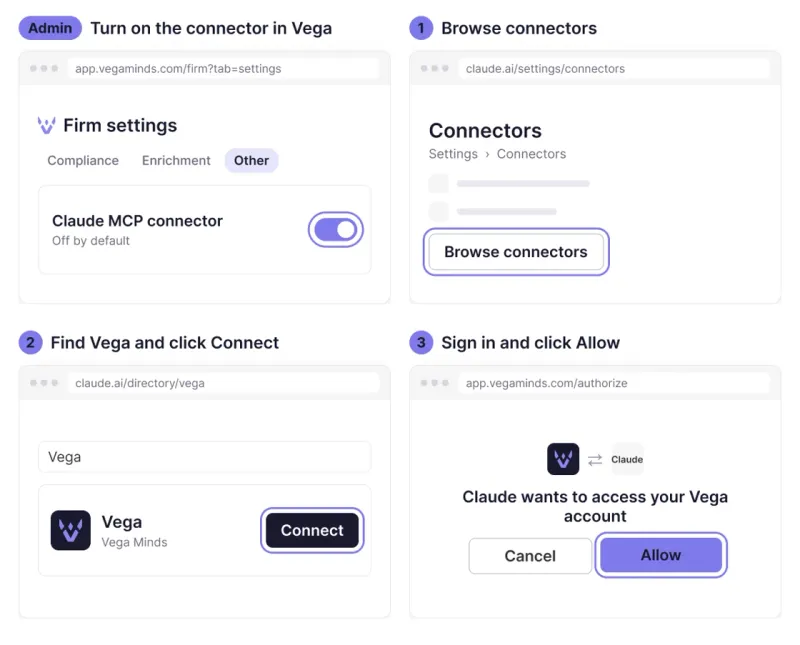
First, a firm admin turns on Claude MCP connector in Vega under Firm > Settings . It's off by default.
Then each person connects their own account:
- In Claude, open Settings > Connectors, click Browse connectors and search for Vega. You can also go straight to claude.ai/directory/vega .
- Click Connect and sign in with your Vega account.
- Click Allow on the Vega consent screen.
On a Claude Team or Enterprise plan, an owner of your Claude organization may need to enable Vega in Claude's admin settings before people can connect.
Available on Vega Core and Vega Pro.
Financial planning deliverables
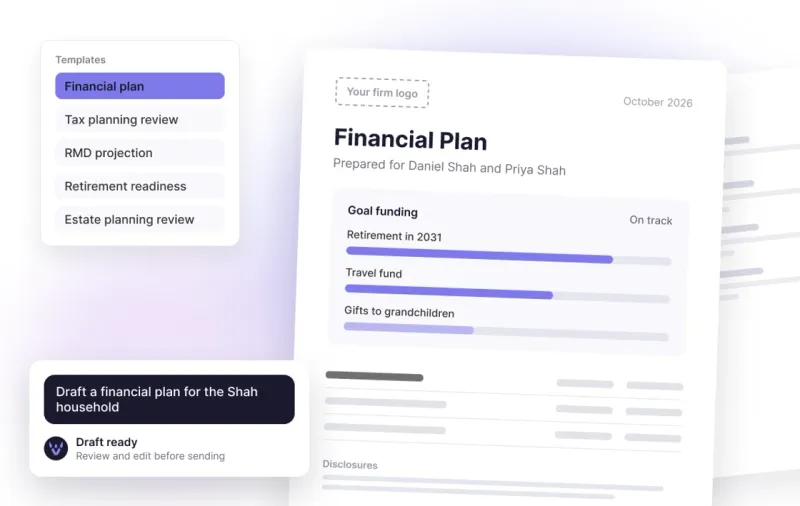
Ask the Vega chat for a planning document and it drafts one using the client's information in Vega. You can review and edit it before sending.
Available templates:
- Financial plan and plan snapshot
- Tax planning review and Roth conversion analysis
- RMD projection and rollover options analysis
- Retirement readiness, goal funding and cash flow projection
- Estate planning review and charitable giving analysis
- Meeting recap
Charts and tables are included, and the numbers match across the whole document. Your firm's logo and disclosures are added automatically. You can export to PDF, Word or Google Docs. Vega can also create other files on request, like spreadsheets and slide decks.
Creating and editing deliverables and files is part of Vega Pro.
Living story
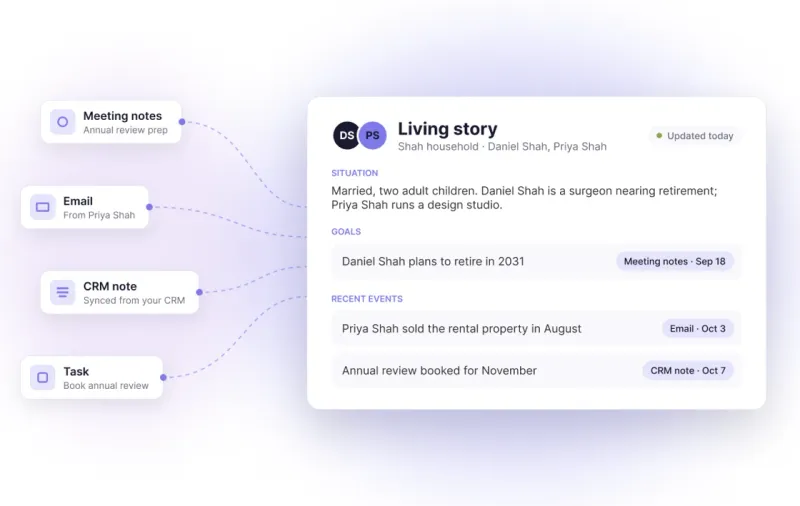
Each client and household now has a Living story: a short written profile covering their situation, goals and recent events. Vega updates it every day from new meeting notes, emails, CRM notes and tasks.
- Each fact shows when it was learned.
- Routine messages, like scheduling emails, are left out.
- A household's story includes what's logged on each of its members.
Living stories are available to firms on Vega Pro.
Compliance review of meetings
Vega already reviews client emails and deliverables for compliance. It now reviews meeting transcripts too, and flags anything your compliance team should look at.
It reads the full transcript rather than the summary, which helps it tell a joke from actual advice. Each review has a status your compliance team can track, and advisors can be copied on compliance notifications.
Compliance review of meetings is included with Vega Pro.
CurrentClient integration
Connect CurrentClient once and your recorded calls show up in Vega as meetings, matched to the client, with a transcript, notes and suggested follow-ups.
- Vega checks for new recordings throughout the day.
- Voicemails are skipped.
- Each call gets a title based on what was discussed.
Google Drive Google Docs integration
If your firm uses Google Workspace, you can now export any Vega deliverable straight to Google Docs. Connect Google Drive once from your Google integration in Vega. After that, choosing Google Docs as the export creates an editable Google Doc in your own Drive and opens it for you. Your firm's logo, charts and tables come through, so you can make final edits, share it with colleagues or send it to the client from Google. PDF and Word exports are still available.
Client documents
You can now permanently attach documents to a client or household file, and Vega will use them appropriately when you ask about that client (or ignore them if they one day become irrelevant because newer documents were uploaded — the AI is smart!). For example, it can find the beneficiary on a client's IRA from the statement in their file. Documents can also be tagged.
Firm-wide meeting types
Admins can now create meeting types for the whole firm, such as Annual Review or Discovery, so everyone picks from the same list and reporting is consistent.
Each meeting type has default settings for who receives the notes and who gets notified, for example an associate or the operations team. These apply automatically after each meeting of that type, and advisors can change them for their own meetings.
The latest AI models
Vega now runs on the newest models from OpenAI, Anthropic, and Google:
- GPT-6.1 Sol (OpenAI) is now one of the models most used by the Client deliverables feature. It handles multi-step requests and long documents better than competing models. It is intelligent but slow, so we pair it with faster but less capable models for this workload.
- Claude Opus 5.5 and Sonnet 5.5 (Anthropic) are now our preferred models meeting preparation, analysis and writing.
- Gemini 3.8 Flash (Google) and GPT-6 Luna (OpenAI) are implemented for quick background tasks, such as deciding which emails and notes belong in a Living story!
At core, Vega Minds is an orchestrator. Our role to assemble the most appropriate models to give you the most accurate responses as advisors with domain-specific workflows. We move fast on model updates. We have a thorough process for testing each new model release, and when one performs better, we switch Vega over to it quickly.
Salesforce households and opportunities
- After a meeting, Vega can suggest updates to the household record, not only to individual contacts. Notes and tasks are now linked to households too.
- Firms on Financial Services Cloud get suggestions that fit its household and person account setup.
- Vega now reads your opportunities. When new business comes up in a meeting or in chat, it suggests an opportunity with the stage, amount and close date filled in, and you can create it in Salesforce in one click.
What's next
If you'd like Vega Pro or the Claude connection, email us at contact@vegaminds.com and we'll set it up. And if there's something you'd like us to build next, let us know.